Welcome to the Prices & Extras section! This is where you set your hourly rate and offer optional add-ons that enhance the guest experience. Whether your park is cozy and quiet or packed with playful features, your pricing should reflect the care, space, and value you provide.
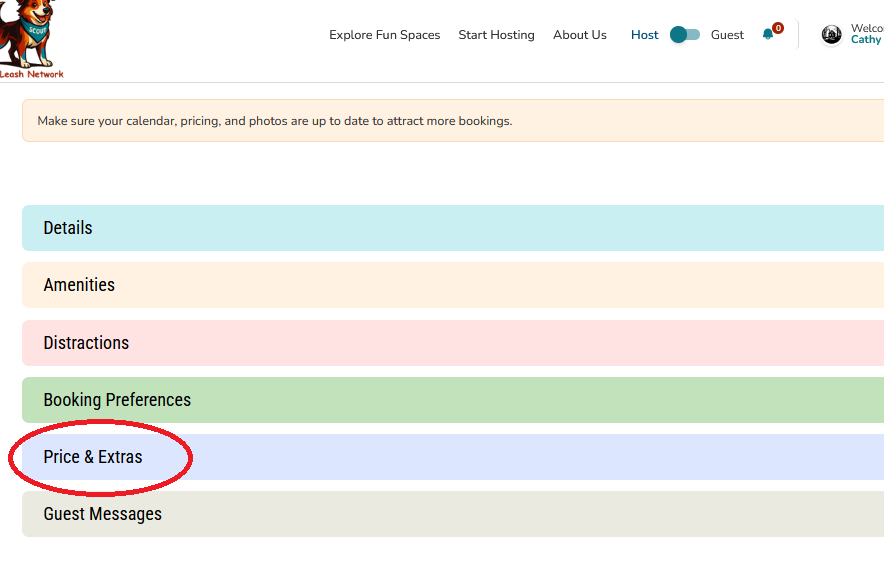
About This Section
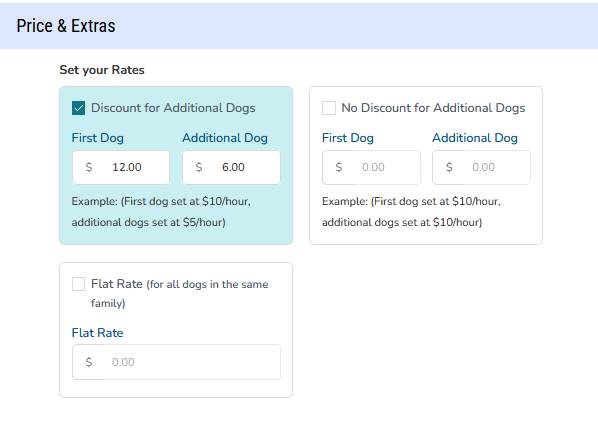
Pricing your private dog park is a key part of attracting guests while keeping your hosting sustainable. That’s why Off-Leash Network uses a tiered pricing strategy that gives Hosts flexibility and control. This strategy empowers Hosts to fine-tune their pricing model, making their private dog park both accessible and financially sustainable.
You can choose between:
- First Dog + Additional Dogs – Set a base rate for the first dog and a separate rate for each additional dog.
- Flat Rate – One price covers all dogs in the booking.
This approach helps you tailor pricing to your space, your hosting style, and the kind of experience you’re offering.
Sample Pricing Models
Here are three pricing approaches you can choose from, depending on your preferences:
- Discount for Additional Dogs
Example: First dog: $10/hour; additional dogs: $5/hour - No Discount for Additional Dogs
Example: First dog: $10/hour; additional dogs: $10/hour - Flat Rate (Regardless of Number of Dogs)
Example: First dog: $25/hour; additional dogs: $0/hour
Pricing Info
The price you enter is the total amount the Guest will pay.
To help you plan, here’s what to factor in:
|
Setting your price with these in mind helps ensure your park stays profitable and your hosting experience remains stress-free.
How to Set Your Price
Start by assessing the unique features of your dog park. Consider:
- Size & Location
Larger spaces or parks in high-demand areas may justify higher rates. - Amenities
Do you offer agility equipment, shaded seating, water stations, or waste disposal? These add value. - New Park?
If you’re just getting started, we recommend setting a lower price to help build reviews and attract your first guests. You can gradually increase your rate as your reputation and visibility grow.
However, we don’t recommend setting your rate too low. Doing so may undervalue your space, create unrealistic expectations, and make it harder to adjust pricing later. Aim for a rate that reflects the quality of your park while remaining competitive and accessible.
Compare Your Listing to Others
Nobody knows your listing better than you do—but it can be hard to price what makes your space special without comparing it to others. Consider:
How Similar Listings Are Determined
Factors include:
- Location
- Size
- Features and amenities
- Ratings and reviews
- What other listings guests browse while viewing yours
What to Compare With
- Local Parks – Compare entry fees for public parks with similar amenities.
- Pet-Friendly Spaces – Check rates for dog-friendly rentals, daycare services, or fenced yards.
Competitor Listings – Research other private dog parks to see what they charge and what they offer.
Key Considerations
- Peak vs. Off-Peak Rates
Adjust pricing based on demand (e.g., weekends vs. weekdays). - Maintenance Costs
Factor in upkeep, cleaning, and improvements to ensure long-term sustainability. - Guest Experience
Competitive pricing should reflect the quality, safety, and uniqueness of your space.
By setting a fair and thoughtful price, you’ll attract responsible dog owners while ensuring your park remains a valuable and enjoyable space for all.
Extras
Want to offer something special? You can add customizable Extras—goods, rentals, or experiences—for an added fee at checkout. If a guest has purchased an extra, it'll appear in your booking confirmation email and on your host booking detail page.
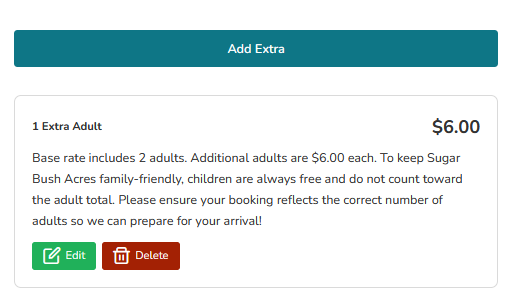
You’ll set the name, description, and hourly price. If an Extra has multiple quantities (like 1 or 2 extra people), list each option separately so guests can choose what fits.
Examples of Extras include:
- Swimming pools
- Wash stations
- Additional people (e.g., 1 Extra Adult – $5, 2 Adults – $10)
- Picnic setups or seasonal features
These add-ons help you personalize the experience and boost your earnings—all while giving guests more ways to enjoy your space.
Tip for New Hosts:
Start with a simple pricing structure, then add Extras as you learn what guests love most about your park. You can always adjust as you go!
Was this article helpful?
That’s Great!
Thank you for your feedback
Sorry! We couldn't be helpful
Thank you for your feedback
Feedback sent
We appreciate your effort and will try to fix the article