Welcome to your My Listing page. This is where you manage your park’s public profile, update details, and keep everything looking fresh and inviting for Guests. Whether you're just getting started or tweaking your setup, this page puts you in the driver’s seat.
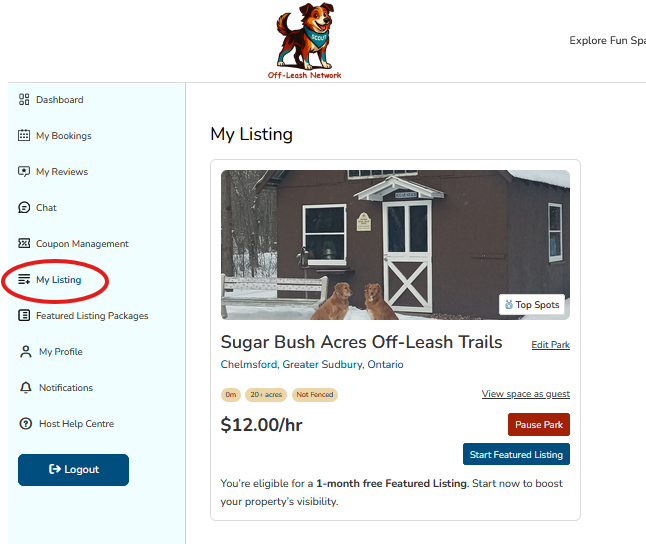
What You’ll See Here
- Your Park Snapshot
Quick overview of your park’s name, location, acreage, fencing status, and hourly rate. It’s the first thing Guests notice—make it shine! - Photo Preview
Your featured image gives Guests a feel for your space. Want to update it? Just click “Edit Park.” - Park Management Tools
- Edit Park – Update your description, amenities, or photos anytime.
- View Space as Guest – See your listing through a Guest’s eyes.
- Pause Park – Temporarily hide your listing if you need a break or are making changes.
- Start Featured Listing - Highlights your park in the "Featured Listing" section to boost your property's visibility.
- Add a New Park – Hosting more than one space? Easily create additional listings here.
Why This Page Matters
- Stay Current
Keeping your listing up to date helps Guests feel confident and informed. - Showcase Your Space
Highlight what makes your park special—whether it’s scenic trails, wide-open fields, or cozy corners for play. - Control Visibility
You decide when your park is active and when it’s paused. Flexibility is built in. - Grow Your Hosting
Ready to expand? Adding a new park is just a click away.
New to Hosting?
If you’re setting up your listing for the first time, we recommend checking out the Listing Your Park articles for details. They’ll help you craft a listing that’s clear, welcoming, and ready to attract happy Guests.
Was this article helpful?
That’s Great!
Thank you for your feedback
Sorry! We couldn't be helpful
Thank you for your feedback
Feedback sent
We appreciate your effort and will try to fix the article